You can reset the StorCenter by holding the reset button on the back panel for 15 seconds. The status light on the front panel will blink red once the reset process has started. If the StorCenter was properly reset you will be required to reperform the Initial Configuration steps.
Resetting the StorCenter will return the device name, administrator password, date/time, network settings and email notifications to their default setting. Users, groups, and shares will not be affected by the reset with the exception that administrator users will be reset to non-administrator status. When you reconfigure the box you can enter the name of an existing user in the Administrator field and administrator privileges will be restored for that user.
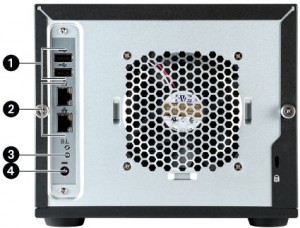
1- High-Speed USB 2.0 Connectors: Supports devices such as USB storage devices and printers. The StorCenter Server is capable of sharing 3 USB printers and 3 USB storage devices with other systems on your network.
2- Gigabit Ethernet: This model includes high-speed ethernet connectors that will automatically detect your network speed (10/100/1000Base-T).
3- Factory Reset Button: Hold the RESET button for four seconds to return to factory defaults. All settings will be lost.
4- Power Connector: Plug the power cord into this connector and a UPS.