Install and Configure Primary (Master) BIND DNS Server – RHEL 6 – CentOS 6

Install and Configure Primary (Master) BIND DNS Server – RHEL 6 – CentOS 6

Red Hat - CentOS - Fedora, Video Tutorials
BIND DNS Server is a widely used DNS Server. Because domain names are alphabetic, they are easier to remember. So if we will browse the Internet we don’t need to remember IP addresses. For example, the domain name www.yourdomain.com might translate to 192.168.0.1. This video tutorial will show you how to setup and configure Primary (Master) BIND DNS Server on RHEL 6.x  or CentOS 6.x: Install BIND Configure BIND Create primary DNS zone for linuxlab.local domain Add NS, A, MX records to zone Steps: 1. Install BIND yum install bind 2. Enable named service chkconfig named on 3. Edit /etc/named.conf 4. Start named ( BIND) service service named start 5.Edit /etc/named.conf 6. Copy /var/named/named.localhost cp named.localhost linuxlab.local 7. Edit /var/named/linuxlab.local $TTL 1D @ IN SOA ns1.linuxlab.local. hostmaster.linuxlab.local. ( 0 ; serial 1D…
Read More
Managing Partitions in RHEL 6.x – CentOS 6.x

Managing Partitions in RHEL 6.x – CentOS 6.x

Red Hat - CentOS - Fedora
The fdisk command is a text-based utility for viewing and managing hard disk partitions on Linux. It’s one of the most powerful tools you can use to manage partitions, but it’s confusing to new users. Using fdisk you can create a new partition, delete an existing partition, or change existing partition. Using fidsk you are allowed to create a maximum of four primary partition, and any number of logical partitions, based on the size of the disk. This video tutorial will go through the basics of using fdisk to manage a partition table. After using fdisk, we will have see how to use a mkfs command to format new partitions with a file system. Tasks: 1. Identify current storage configuration fdisk -l 2. Provision 1 or more usable partitions parted…
Read More
Install and Configure DHCP Server on CentOS 6.x – RHEL 6.x

Install and Configure DHCP Server on CentOS 6.x – RHEL 6.x

Red Hat - CentOS - Fedora, Video Tutorials
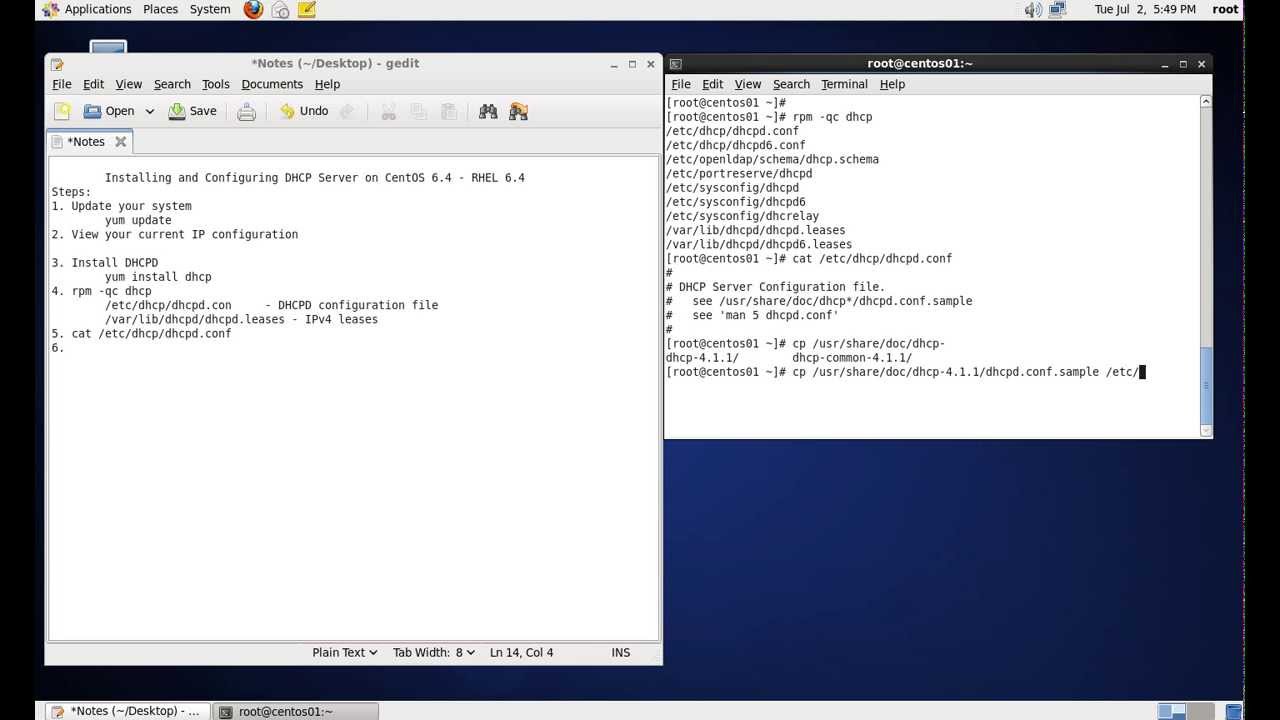
What is DHCP? DHCP stands for Dynamic Host Configuration Protocol. DHCP is a standardized network protocol used on Internet Protocol networks for dynamically distributing network configuration parameters, such as IP addresses for interfaces and services. DHCP is configured in a server-client model. DHCP server is the one assigning IP Addresses to client computers on the network. Each client is assigned a unique IP Address. DHCP server has a number of IP Addresses available in it’s pool. Steps: 1. Install DHCP yum install dhcp rpm -qc dhcp /etc/dhcp/ - container for DHCPD configuration /etc/dhcp/dhcpd.conf - IPv4 config /var/lib/dhcpd - container for leases /var/lib/dhcpd/dhcpd.leases - IPv4 leases 2. Enable DHCPD service chkconfig dhcpd on 3. View dhcpd.conf file cat /etc/dhcp/dhcpd.conf 4. Copy sample conf file to /etc/ cp /usr/share/doc/dhcp-4.1.1/dhcpd.conf.sample  /etc/dhcp/dhcpd.conf 5. Edit the…
Read More
Install and Configure VSFTPD FTP Server – RHEL 6 – CentOS 6

Install and Configure VSFTPD FTP Server – RHEL 6 – CentOS 6

Red Hat - CentOS - Fedora, Video Tutorials
When you think of transferring files, you probably think of the File Transfer Protocol (FTP) because it has been around for so long. While simple to use, FTP has become obsolete because it lacks the ability for secure file transfers. vsftpd (Very Secure File Transport Protocol Daemon) is a secure, fast FTP server for Unix/Linux systems. Steps: 1. Install vsftpd yum install vsftpd 2. Enable vsftpd service chkconfig vsftpd on 3. Start vsftpd service service vsftpd start 4. Check ftp port netstat -ntl | grep 21 5. Test ftp server access FTP server is running and anonymous access is enabled by default 6. Disable anonymous access Edit /etc/vsftd/vsftpd.conf anonymous_enable=NO 7. Enable dual logging dual_log_enable=YES It created /var/log/vsftpd.log file which uses vsftpd log format 8. Enable server time for display of…
Read More
Managing SWAP Partitions – RHEL 6.x – CentOS 6.x

Managing SWAP Partitions – RHEL 6.x – CentOS 6.x

Red Hat - CentOS - Fedora, Video Tutorials
If the system needs more memory resources and the RAM is full, inactive pages in memory are moved to the swap space. Swap space is a portion of a hard disk drive (HDD) that is used for virtual memory. It can be whole disk partition or just a file inside an existing partition or a combination of swap partitions and swap files. We will see how to manage SWAP Partitions on RHEL 6.x or CentOS 6.x Steps: 1. Show current SWAP allocation free -m swapon -s 2. Create additional SWAP space from new partition Reboot is required at this step 3. Make swap mkswap /dev/sdb2 UUID=8bced662-e967-4861-9bac-6df8957b3eb5 4. Update /etc/fstab UUID=8bced662-e967-4861-9bac-6df8957b3eb5 swap swap defaults 0 0 5. Re-reads /etc/fstab for swap swapon -a 6. Show swap usage summary by device swapon -s free…
Read More
Install and Configure Secondary (Slave) BIND DNS Server – RHEL 6 – CentOS 6

Install and Configure Secondary (Slave) BIND DNS Server – RHEL 6 – CentOS 6

Red Hat - CentOS - Fedora, Video Tutorials
After we have installed BIND as a master DNS server (centos01) (as explained in my recent video), we can now set up a secondary DNS server (centos02) with BIND on CentOS. centos02 acts as a backup if there are problems with centos01. This tutorial will show you how to setup and configure Secondary (Slave) BIND DNS Server on RHEL 6.x or CentOS 6.x Note: centos01.linuxlab.local is Primary (Master) DNS server for linuxlab.local domain We'll make centos02.linuxlab.local ( 192.168.0.22) as secondary dns server for linuxlab.local domain Steps: 1. Define centos02 as Name Server in the primary zone 2. Install bind on other server 3. Configure /etc/named.conf on centos02 (secondary dns server) 4. Allow zone transfer to only our secondary dns server in primary dns server allow-transfer { 192.168.0.22; }; 5. start…
Read More
Install Fedora 19 KDE Desktop Edition in VMware Workstation 9

Install Fedora 19 KDE Desktop Edition in VMware Workstation 9

Red Hat - CentOS - Fedora, Video Tutorials, Workstation
Anaconda installer for Fedora 18 was a complete mess after its installer user-interface was redone. The Fedora 19 KDE installation is fairly simple and easy process. The Best Features Of Fedora 19 Fedora 18 is one of the first major tier-one Linux distributions shipping the GCC 4.8 compiler by default. GCC 4.8 has a whole lot of improvements from faster performance for some workloads to better instruction set coverage on new processors and full C++11 support. GNOME 3.8, KDE Plasma 4.10, and MATE 1.6 are among the Linux desktop environment options available on Fedora 19. GNOME 3.8, of course, is the default desktop environment for Fedora Linux 19. RPM 4.11 is now in use for package management and it brings better performance, lower memory usage, better file conflict detection, and…
Read More
How to Enable SSL Support for VSFTPD – RHEL 6 – CentOS 6

How to Enable SSL Support for VSFTPD – RHEL 6 – CentOS 6

Red Hat - CentOS - Fedora, Video Tutorials
FTP, or file transfer protocol, was a popular way to transfer files between local and remote computers in the past. Traditional FTP is rather insecure. When you login, your username and password are transmitted in clear text, raising the possibility of your credentials being sniffed. If you still want to use FTP instead of a more secure alternative like SFTP, which uses the SSH protocol to implement file transfers, you can secure it somewhat by configuring FTP to use SSL. You can quite easily configure your vsftpd server to use OpenSSL encryption, so that usernames & password, and even data files, are encrypted during transfer. It takes just a few simple steps. Steps: 1. Check whether the latest mod_ssl installed locate mod_ssl 2. Install the latest mod_ssl via yum yum…
Read More