
How to Install Prerequisites for McAfee Vulnerability Manager (Foundstone) on Windows Server 2008 R2 and SQL 2008 R2

How to Install Prerequisites for McAfee Vulnerability Manager (Foundstone) on Windows Server 2008 R2 and SQL 2008 R2

Security
Be aware that Windows 2008 is not supported with any service pack level. So, you must go with Windows Server 2008 R2. IIS Installation on Windows Server 2008 R2: Start -- Administrative Tools --- Server Manager. In the console tree , select Roles. Select Add Roles. Select Web Server (IIS) role to install. Select Role Services from the left pane. Select CGI under Application Development. Click Next, then click Install. Once the installation is complete, click Close. Microsoft SQL Server 2008 R2 Installation Settings: Use the following settings when setting up your Microsoft SQL Server 2008 R2. Database Engine Services, including all sub-features Client Tools Connectivity Client Tools Backward Compatibility Management Tools (complete)
Read More
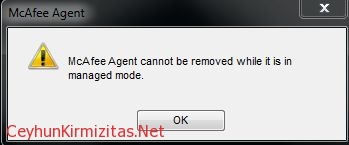
McAfee Agent cannot be removed while it is in managed mode

McAfee Agent cannot be removed while it is in managed mode

Security
This article shows how to uninstall McAfee Agent when it is in Managed Mode from computer. Problem: The following message displays when select Remove for the McAfee Agent through Add \ Remove Programs or Programs and Features on client computers: " McAfee Agent cannot be removed while it is in managed mode " As long as the agent is in Managed Mode or being managed by ePO server, this message appears. Solution: The computer must be removed from Managed Mode Steps to uninstall McAfee Agent: 1- Open Command Prompt 2- Go to the folder: C:\Program Files (x86)\McAfee\Common Framework on X64 systems C:\Program Files\McAfee\Common Framework on X86 systems 3- Run the " frminst.exe /remove=agent " command without quotes
Read More