Problem:
You followed all steps from a Deploying SSTP Remote Access Step by Step Guide. However, when vista or windows 7 client tries to connect VPN server you get this error:
” The revocation function was unable to check revocation because the revocation server was offline. ”

Workaround:
The SSL VPN client needs to be able to download the CRL to confirm that the server certificate on the VPN server has not been revoked. You must either publish the CRL on a server that is accessible on the Internet or configure the client to not require CRL checking.. Because it exposes a private server name to the Internet, you can do the following as an alternative solution.
Solution:
Disable CRL Checking on VPN Client
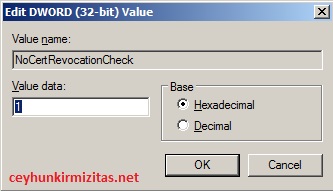
To disable CRL checking, create a registry setting at the following location on VPN Client:
HKEY_LOCAL_MACHINE–>System->CurrentControlSet->Services->Sstpsvc->parameters
The setting must be a DWORD value named NoCertRevocationCheck . Set the value to 1