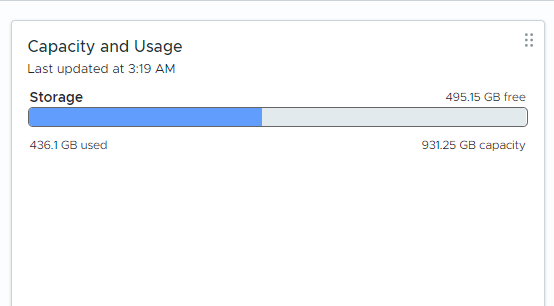
After exporting several virtual machines from my ESXi environment, I noticed that datastore usage had increased significantly. Although the guest operating systems were using only a small portion of their virtual disks, the VMDK files appeared to occupy space close to their full provisioned size.
For example, a virtual machine with a 100 GB thin-provisioned disk that was actually using only around 17 GB inside the guest OS appeared to consume almost the entire provisioned disk size on the datastore.
This situation can quickly become problematic in environments where multiple virtual machines are exported or stored for later use. Datastores may appear nearly full even though the real data footprint is much smaller.
Why Does This Happen?
When virtual machines are exported (for example as OVF or OVA), thin-provisioned disks may become inflated. This means the VMDK stored on the datastore may occupy space close to the full provisioned disk size rather than the actual data used inside the guest operating system.
As a result, datastore usage can increase significantly even though the virtual machines themselves contain far less data.
Example scenario:
Thin disk provisioned size: 100 GB
Actual data inside VM: 17 GB
Datastore usage: ~100 GB
Checking the Actual Disk Usage
Before reclaiming space, it is useful to check the real disk usage of virtual machine directories on the datastore. You can do this directly from the ESXi shell.
[root@esx8:~] du -sh /vmfs/volumes/<DATASTORE_NAME>/*This command shows how much space each virtual machine directory is actually consuming.
You can also check the overall datastore usage using:
[root@esx8:~] df -hReclaiming Space Using vmkfstools
VMware provides a built-in command to reclaim unused blocks from thin-provisioned disks.
[root@esx8:~] vmkfstools -K Ubuntu-2404-4-T.vmdkThis command performs a hole-punch operation, scanning the virtual disk and returning unused blocks back to the VMFS datastore.
During the process you will see output similar to:
Hole Punching: 47% doneDepending on disk size, the operation may take several minutes to complete.
Automating the Process
If you have many virtual machines on a datastore, running the command manually for each disk can be time-consuming.
The following script scans a datastore for VMDK descriptor files and automatically runs vmkfstools -K on each disk.
#!/bin/sh

###############################################################################
# Script Name : vmfs_thin_reclaim.sh
# Description : Reclaims unused space from thin provisioned VMDK files by
#               running 'vmkfstools -K'.
#
#               This script was written for situations where virtual machines
#               were exported (for example as OVF/OVA). During the export
#               process thin provisioned virtual disks may become inflated
#               to their full provisioned size.
#
#               After export, VMDK files stored on a VMFS datastore may occupy
#               space close to the provisioned disk size rather than the actual
#               data used inside the guest operating system.
#
# Author      : Ceyhun Kirmizitas
# Website     : https://ceyhunkirmizitas.net
# Date        : 2026-03-15
# Version     : 1.3
#
# Usage
#   sh vmfs_thin_reclaim.sh <DATASTORE_NAME>
#
# Example
#   sh vmfs_thin_reclaim.sh DS_Prod
#   sh vmfs_thin_reclaim.sh DS_Dev
#
# Notes
# - Virtual machines should be powered off for best results
# - Script processes descriptor *.vmdk files only
# - *-flat.vmdk files are skipped automatically
###############################################################################

DATASTORE="$1"

if [ -z "$DATASTORE" ]; then
    echo "Usage: $0 <DATASTORE_NAME>"
    exit 1
fi

DATASTORE_PATH="/vmfs/volumes/$DATASTORE"

if [ ! -d "$DATASTORE_PATH" ]; then
    echo "Datastore not found: $DATASTORE_PATH"
    exit 1
fi

echo ""
echo "==============================================="
echo "VMFS Thin Reclaim Script"
echo "Datastore : $DATASTORE"
echo "Started   : $(date)"
echo "==============================================="

cd "$DATASTORE_PATH" || exit 1

find . -type f -name "*.vmdk" ! -name "*-flat.vmdk" | while read vmdk
do
    vmdk=$(echo "$vmdk" | sed 's#^\./##')
    dir=$(dirname "$vmdk")

    before=$(du -s "$dir" | awk '{print $1}')

    echo ""
    echo "---------------------------------------"
    echo "VM Disk : $DATASTORE/$vmdk"
    echo "Before  : $(du -sh "$dir" | awk '{print $1}')"

    vmkfstools -K "$vmdk"

    after=$(du -s "$dir" | awk '{print $1}')

    echo "After   : $(du -sh "$dir" | awk '{print $1}')"

    diff=$((before-after))
    echo "Saved   : $(echo $diff | awk '{printf "%.2f GB\n",$1/1024/1024}')"

done

echo ""
echo "==============================================="
echo "Reclaim process finished"
echo "Finished : $(date)"
echo "==============================================="Running the Script
[root@esx8:~] sh vmfs_thin_reclaim.sh DS_ProdExample Output
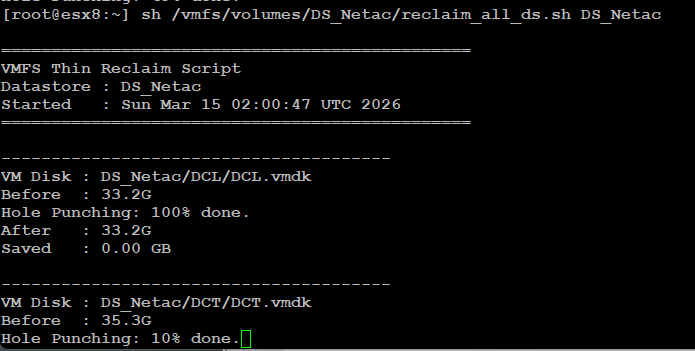
VM Disk : DS_Sandisk/_VM-Templates/W2025_Eng-T/W2025_Eng-T.vmdk
Before  : 100.0G
Hole Punching: 100% done.
After   : 17.5G
Saved : 82.47 GBConclusion
Exporting virtual machines can sometimes cause thin-provisioned disks to become inflated, which may significantly increase datastore usage.
Using vmkfstools -K, it is possible to reclaim unused blocks and return them to the datastore. Automating this process with a simple script can save a considerable amount of time when managing multiple virtual machines.
This approach is particularly useful in lab environments or template repositories where exported virtual machines are frequently stored on VMFS datastores.